



SSD versus Enterprise SAS and SATA disks
by Johan De Gelas on March 20, 2009 2:00 AM EST- Posted in
- IT Computing
Testing in the Real World
As interesting as the SQLIO and IOMeter results are, those benchmarks focus solely on the storage component. In the real world, we care about the performance of our database, mail, or fileserver. The question is: how does this amazing I/O performance translate into performance we really care about like transactions or mails per second? We decided to find out with 64-bit MySQL 5.1.23 and SysBench on SUSE Linux SLES 10 SP2.
We utilize a 23GB database and carefully optimized the my.cnf configuration file. Our goal is to get an idea of performance for a database that cannot fit completely in main memory (i.e. cache); specifically, how will this setup react to the fast SLC SSDs. The Innodb buffer pool that contains data pages, adaptive hash indexes, insert buffers, and locks is set to 1GB. That is indeed rather small, as most servers contain 4GB to 32GB (or even more) and MySQL advises you to use up to 80% of your RAM for this buffer. Our test machine has 8GB of RAM, so we should have used 6GB or more for this buffer. However, we really wanted our database to be about 20 times larger than our buffer pool to simulate a large database that can only partially fit within the memory cache. With our 32GB SLC SSDs, using a 6.5GB buffer pool and a 130GB large database was not an option. Hence, the slightly artificial limitation of our buffer pool size.
We let SysBench perform all kinds of inserts and updates on this 23GB database. As we want to be fully ACID compliant our database is configured with:
innodb_flush_log_at_trx_commit = 1
After each transaction is committed, there is a "pwrite" first followed by an immediate flush to the disk. So the actual transaction time is influenced by the disk write latency even if the disk is nowhere near its limits. That is an extremely interesting case for SSDs to show their worth. We came up with four test configurations:
- "Classical SAS": We use six SAS disks for the data and two for the logs.
- "SAS data with SSD logging": perhaps we can accelerate our database by simply using very fast log disks. If this setup performs much better than "classical SAS", database administrators can boost the performance of their OLTP applications with a small investment in log SSDs. From an "investment" point of view, this would definitely be more interesting than having to replace all your disks with SSDs.
- "SSD 6+2": we replace all of our SAS disks with SSDs. We stay with two SSDs for the logs and six disks for the data.
- "SSD data with SAS logging": maybe we just have to replace our data disks, and we can keep our logging disks on SAS. This makes sense as logging is sequential.
Depending on how many random writes we have, RAID 5 or RAID 10 might be the best choice. We did a test with SysBench on six Intel X25-E SSDs. The logs are on a RAID 0 set of two SSDs to make sure they are not the bottleneck.
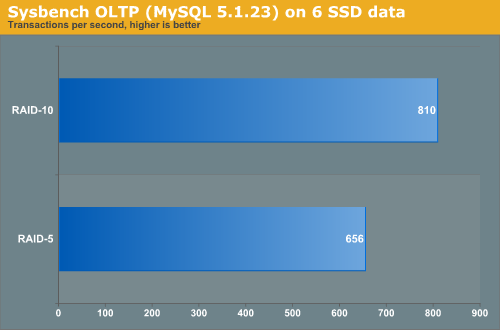
As RAID 10 is about 23% faster than RAID 5, we placed the database on a RAID 10 LUN.
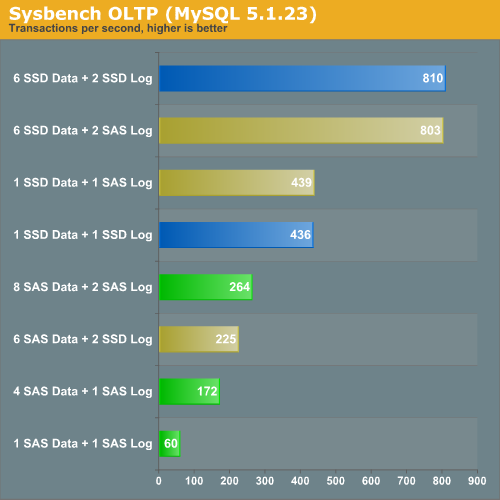
Transactional logs are written in a sequential and synchronous manner. Since SAS disks are capable of delivering very respectable sequential data rates, it is not surprising that replacing the SAS "log disks" with SSDs does not boost performance at all. However, placing your database data files on an Intel X25-E is an excellent strategy. One X25-E is 66% faster than eight (!) 15000RPM SAS drives. That means if you don't need capacity, you can replace about 13 SAS disks with one SSD to get the same performance. You can keep the SAS disks as your log drives as they are a relatively cheap way to obtain good logging performance.


 Facebook
 Twitter
 RSS
RSS


67 Comments
View All Comments
shady28 - Sunday, November 15, 2009 - link
I would have really like to see single drive performance of SAS 15K drives vs SSDs. The cost of a SAS controller ($60) + a 15K 150Gig drive ($110-$160) is less than any of the high end SSDs, and about the same as a low end SSD. It's a viable option to get a 15K Drive, but very difficult to see what is the best choice when looking at RAID configs and database IOPs.
newriter27 - Tuesday, May 5, 2009 - link
What was the Queue Depth setting used with IOmeter? Was it maintained consistently?Also, how come no response times?
mikeblas - Friday, April 17, 2009 - link
Intel has posted a firmware upgrade for their SSD drives which tries to address the write leveling problem. The patch improves matters, somewhat, but the overall performance level from the drives is still completely unacceptable for production applications.You can find it here: http://www.intel.com/support/ssdc/index_update.htm">http://www.intel.com/support/ssdc/index_update.htm
Lifted - Sunday, April 12, 2009 - link
I like it!turrican2097 - Monday, March 30, 2009 - link
Please mention or correct this on your article.1) You should mention that the price per GB is 65x higher than the 1TB drives, since you chose to include them.
2) Your WD is a poor performance 5400RPM Green Power drive: http://www.techreport.com/articles.x/16393/8">http://www.techreport.com/articles.x/16393/8
3) If you make such a strong point on how much faster SSDs are than platters, you can't pick the best SSD and then use the hardrives you happen to have laying around the lab. Pick Velociraptors or WD RE3 7200RPM and then Seagate 15K7.
Thank you
mutantmagnet - Monday, April 6, 2009 - link
It's irrelevant. Raptors don't outperform SAS which are better in terms of performance for the GB paid for. There's no need to belittle them when they are clearly aware of the type of point you are making and went beyond it.So far I've found these recent SSD articles to be a fun and worthwhile read; and the comments have been invaluable, even if some people sound a little too aggressive in making their points.
virtualgeek - Friday, March 27, 2009 - link
Just wanted to point this out - we are now shipping these 200GB and 400GB SLC-based STEC drives in EMC Symmetrix, CLARiiON and Celerra. These are the 2nd full generation of EFDs.Gang - this IS the future of performance-oriented storage (not implying it will be EMC-unique - it won't be - everyone will do it - from the high end to the low end) - only a matter of time (we're currently at the point where they are 1/3 the acquisition cost to hit a given IOPS workload - and they have dropped by a factor of 4x in ONE YEAR).
With Intel and Samsung entering to the market full force - the price/performance/capacity curve will continue to accelerate.
ms0815 - Friday, March 27, 2009 - link
Since modern Graphic cards crack passwords more than 10 times faster than a CPU, wouldn't they also be greate Raid Controllers with their massive paralel design?Casper42 - Thursday, March 26, 2009 - link
I would have liked to have seen 2 additional drives tossed into the mix on this one.1) The Intel X25-M - Because I think it would serve as a good middleground between the SAS Drives and the E model. Cheaper/GB but still gets you a much faster Random Read result and I'm sure a slightly faster Random Write as well.
2) 2.5" SAS Drives - Because mainstream servers like HP and Dell seem to be going more and more this direction. I don't know many Fortune 500s using Supermicro. 2.5" SAS goes up to 72GB for 15K and 300GB for 10K currently. Though I am hearing that 144GB 15K models are right around the corner.
Thanks for an interesting article!
MrSAballmer - Thursday, March 26, 2009 - link
SDS with ATA!http://www.youtube.com/watch?v=x4dxTRkODbE">http://www.youtube.com/watch?v=x4dxTRkODbE
http://fakesteveballmer.blogspot.com">http://fakesteveballmer.blogspot.com